Sponsored Post
Having too many things going on in the background of fashion photos can often distract attention from the main subject. Whether your main subject is a model, fashion accessory, dress, pair of shoes, or something else entirely – your photo and its composition should be centered on it. If your background is ‘getting in the way’ so to speak then you might want to give thought to changing it.
Ideally, the background of your fashion photos should complement or accentuate the main subject. If that is not the case then switching it for something else would open up several opportunities to improve your photo. Assuming you’re a fan of fashion photos then you may have seen this technique used in the past – where the subject of a fashion photo is placed onto a different and contrasting background so that it is the center of attention.
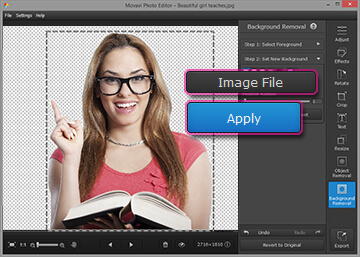
Of course, learning how to change background in existing fashion photo does sound complicated – which is why many people avoid trying. The good news is that with Movavi Photo Editor it just takes a few steps:
- Click ‘Browse for Images’ and select the fashion photo you want to edit.
- Open up the ‘Background Removal’ tab.
- Select the green ‘Foreground Brush’ and use it to highlight the subject that you want to keep.
- Select the red ‘Background Brush’ and use it to highlight the background that you want to remove.
- Click ‘Cut Out’ to remove the background.
- Click ‘Image File’ to add a background from a new image that you will be able to select.
- When you’re satisfied, save the photo by clicking ‘Export’.
By the time you’re done your background should have been replaced so that the subject of your fashion photo is really shown in its best light. Before you export your photo however, be sure to use the other features of Movavi Photo Editor to enhance its quality, remove any unwanted elements, apply stylish filters, add customizable text, and transform the orientation and frame of the photo.
Seeing as these features are all so easy to use, you should have no problem applying them to your fashion photos to bring out the best in it. In fact with a little bit of experimentation you’ll find that Movavi Photo Editor is the perfect tool to create professional-looking fashion photography without any prior experience required.